


01
Feels instant, even on mobile data
Lightweight pages and browser-side processing keep every tool feeling instant — even on mobile data.
Browser-based PDF tools
PDFEdit is a free PDF tool that works entirely in your browser — merge, compress, convert, sign and edit PDFs with no uploads and no accounts.
No sign-up required — everything is free to use
Most used
The tools people reach for every day.
Browse the library
Seven clear groups. Pick a category — every tool inside does exactly what it says.
Rearrange, split and shape documents · 8 tools
Flagship product
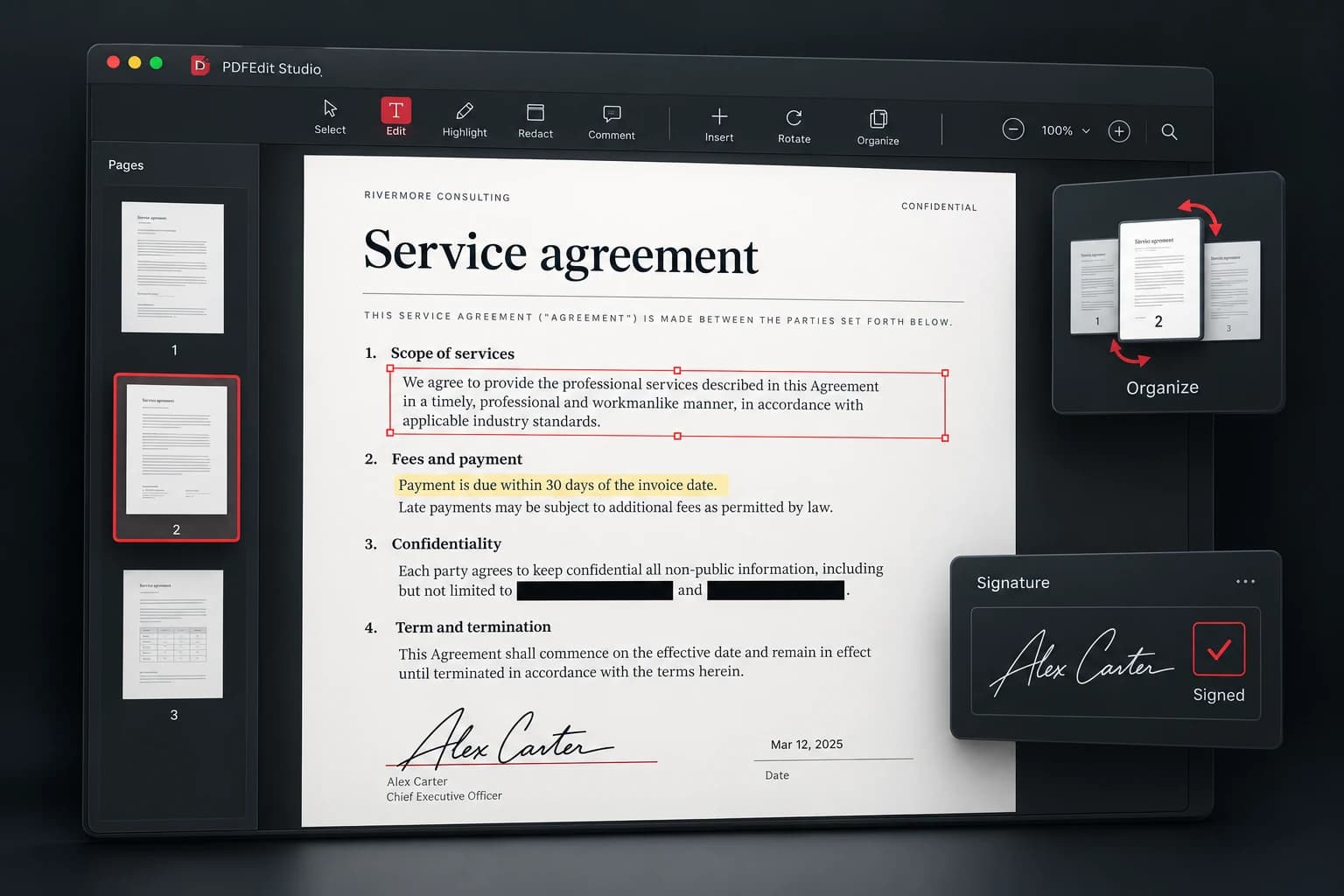
A full document workspace in your browser — edit, sign, redact and organize PDFs. No installs, no uploads.
Free forever · No sign-up · Your files never leave your device
Tools run locally on your device wherever technically possible.
Your documents are processed on your device — they are not uploaded to use the tools.
Open a tool and start working immediately.
The core PDF tools are free to use — no sign-up, no watermarks, no locked features.
Build your CV — professional templates, free forever, no sign-up.
Why PDFEdit
Lightweight pages and browser-side processing keep every tool feeling instant — even on mobile data.
Your documents are processed on your device where possible, instead of being shipped to a server farm.
From quick conversions to the full Studio editor, everything shares the same clean, predictable interface.
Complete index
PDFEdit is a free online PDF editor and document toolkit. Merge and split PDFs, compress large files, convert PDF to Word, JPG or text, create PDFs from images and Word documents, sign and redact, protect with passwords, run OCR on scans — plus practical image, business and security utilities. Every tool below runs in your browser with no account required.
Stamp clean page numbers anywhere
Free • No sign-upStartExtract dominant color palettes, HEX/RGB codes, and contrast ratios directly from any uploaded image.
Local Canvas sampling • Zero uploadsStartShrink file size without the quality loss
Free • No sign-upStartTrim margins and unwanted edges
Free • No sign-upStartRemove unwanted pages visually
Free • No sign-upStartTurn spreadsheets into clean PDFs
Free • No sign-upStartSave selected pages as a new PDF
Free • No sign-upStartBake forms and layers into one file
Free • No sign-upStartConvert iPhone photos to JPG or PDF
Free • No sign-upStartCompress JPEG, PNG, and WebP images directly in your browser with adjustable quality and instant preview.
Zero uploads • In-browser WebAssembly canvasStartCreate and export professional, branded PDF invoices with custom tax rates, line items, and currency support.
No sign-up needed • Direct PDF renderingStartBuild a PDF from your images
Free • No sign-upStartCombine several PDFs into one clean document
Free • No sign-upStartMake scanned pages searchable text
Free • No sign-upStartDrag, reorder, duplicate and delete pages
Free • No sign-upStartThe flagship editor: edit, sign, redact
Free • No sign-upStartHigh-resolution page images or ZIP
Free • No sign-upStartExport every page as a crisp image
Free • No sign-upStartExtract clean, selectable text
Free • No sign-upStartTurn PDFs into editable Word documents
Free • No sign-upStartEncrypt with a password you choose
Free • No sign-upStartGenerate customizable, high-resolution QR codes for URLs, Wi-Fi, and text with instant SVG and PNG downloads.
Instant generation • 100% Client-sideStartBlack out sensitive text for good
Free • No sign-upStartFix page orientation in seconds
Free • No sign-upStartCreate cryptographically secure, random passwords and passphrases with entropy analysis and custom rules.
Web Crypto API • Never storedStartAnalyze word count, reading time, keyword density, and sentence structure for high-ranking SEO copy.
Instant local analysis • Private copyStartDraw, type or upload your signature
Free • No sign-upStartPull pages or ranges out into new files
Free • No sign-upStartCompute income tax with real-time bracket breakdowns: gross income, deductions, tax owed, and net earnings.
Instant math • Client-side computationStartRemove password restrictions you own
Free • No sign-upStartStamp text watermarks with style control
Free • No sign-upStartConvert Word files to polished PDFs
Free • No sign-upStartQuestions
Yes. The everyday PDF tools — merge, split, compress, convert, sign and more — are free to use with no account and no trial walls.
Supported tools process files directly in your browser whenever technically possible, so your documents stay on your device instead of being shipped to a server farm.
No. PDFEdit runs entirely in your web browser on desktop, tablet and mobile. Open a tool and start working immediately.
Convert PDFs to Word documents, JPG or PNG images and plain text, and create PDFs from Word files and images — all from the same toolkit.
PDFEdit Studio is the flagship document workspace: edit text and images, add signatures and shapes, redact sensitive content and export a finished PDF — free, with no sign-up.